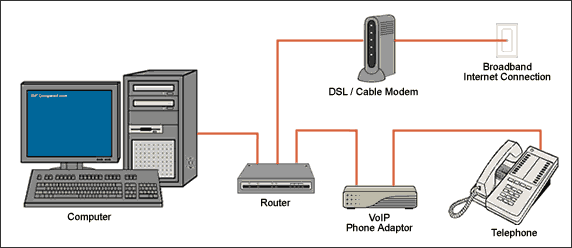
This VoIP service introduction is designed to simplify the VoIP service technology so that consumers considering its use are better informed and familiar with the varying degrees of available services, hardware requirements, and general methods of setup. In a nutshell, Voice over Internet Protocol (VoIP) is a technology that allows you to make telephone calls through the use of a broadband Internet connection instead of a regular analog telephone line. (Note: high speed dial up Internet service is not considered a true broadband connection and will not work with many VoIP service providers because high speed dial up Internet service does not use the same digital technology as a Cable or DSL broadband Internet connection). Some VoIP service providers only allow calls to be made to other subscribers within that same service and is commonly referred to as in-network calling, while others allow calls to be made to anyone who has a telephone number. Moreover, whereas some VoIP service will only work through a computer or a specifically designed VoIP telephone, other services allow a standard run of the mill phone to be used through what is called a VoIP service adaptor. The VoIP service adaptor converts digital voice data packets into an analog signal which is what regular land-line analog telephones require.
VoIP Service Technology Benefits:
VoIP service is more cost effective than traditional phone service and comes with features that are not available through traditional phone services. Along with low domestic and international phone rates, an impressive array of special phone features are available through VoIP service. Typical VoIP service plans allow you to choose your own preferred free local dialing US area code, regardless of where you live. You can add a virtual phone number in any area code, forwarded to your phone. Voicemail messages can be retrieved from your phone or even be emailed to you. You can even add a toll-free number.
Note: An electrical power outage or a broadband Internet service provider outage will prevent operation of the VoIP service, including for emergency purposes (e.g. calling 911).
Featured VoIP Service Provider
Lingo VoIP
Residential VoIP Service Plans:
Hello WORLD Unlimited
$4.95/3mo then just $21.95/mo thereafter
FREE unlimited calling across the U.S.
FREE unlimited calling to 30 countries
Over $50 savings for the first 3 months
FREE activation and equipment - $79.95 value
20+ Lingo VoIP features included
Hello America Unlimited
$4.95/3mo then just $19.95/mo thereafter
FREE unlimited calling across the U.S. and to Canada
FREE activation and equipment - $79.95 value
20+ Lingo VoIP features included
Hello America 500
$4.95/3mo then just $14.95/mo thereafter
500 US, Canada, and Puerto Rico calling minutes any time, day or night
FREE equipment - $50 value
Keep your local phone number
20+ Lingo VoIP features included
Hello America 250
$4.95/3mo then just $7.95/mo thereafter
250 US, Canada, and Puerto Rico calling minutes any time, day or night
FREE equipment - $50 value
20+ Lingo VoIP features included
Talk 365
$195/yr
Unlimited calling in U.S., Canada, and Puerto Rico
Local Number Portability so you can keep your existing phone number
FREE unlimited calling to other In-Network Lingo subscribers
FREE online account management makes it easy to manage your settings, voicemail and more through the web
20+ Lingo VoIP features included
Business VoIP Service Plans:
Business Value
$39.95/mo
500 outgoing minutes to call within the US, to Canada, and Puerto Rico; thereafter you'll still save at just a low 3.5¢/min.
Lingo Office Assistant to manage your business conveniently and remotely
Great low international rates to over 230 countries
One Month FREE* - first 1000 new customers
FREE additional line
FREE Lingo adapter - a $50 value
Convenient online access to and management of your account 24/7
Switch to Lingo and keep your current phone number
20+ Lingo VoIP features included
Business Plus
$49.95/mo
2000 outgoing minutes to call within the US, to Canada, Puerto Rico, and 21 other countries
Lingo Office Assistant to manage your business conveniently and remotely
Great low international rates to over 230 countries
One Month FREE* - first 1000 new customers
FREE additional line
FREE Lingo adapter - a $50 value
Convenient online access to and management of your account 24/7
20+ Lingo VoIP features included
Business Premium
$79.95/mo
Unlimited local and long distance calling within the US including HI, AK, and USVI
Unlimited calling to Canada, Puerto Rico, and 25 countries
Lingo Office Assistant to manage your business conveniently and remotely
Great low international rates to over 230 countries
One Month FREE* - first 1000 new customers
FREE additional line
FREE Lingo adapter - a $50 value
Convenient online access to and management of your account 24/7
20+ Lingo VoIP features included
20+ Lingo VoIP Features:
Voicemail - Receive and Manage Voice Messages by Phone, Web, and Email.
Three-Way Calling - Conference calls are as easy as 1-2-3.
Speed Dial - Cut your phone number down to single digit dialing.
Call Forwarding - Wherever you go, your calls follow...
Simultaneous Ring - One phone number for all your phones - calls reach you anywhere, every time.
Call Waiting - Don't miss an incoming call - even if you're already on the phone!
Caller ID with Name - Shows the number and name of the caller. Know who's calling, before you pick up the phone!
Call Return (*69) - Missed a call? Dial *69 and quickly call them back!
Caller ID Block (*67) - When privacy is in order...
Anonymous Call Rejection (ACR) - Say goodbye to blocked "Anonymous" numbers!
Do Not Disturb (*78) - Forward your calls to voicemail, without the ring!
Last Number Redial - Call the last number you dialed.
Lingo 911 Dialing - Lingo values your safety, so you should know there are important differences between Lingo's 911 dialing features and traditional 911 or E911 service.
Local Phone Number Portability - Keep your existing phone number!
Lingo SoftPhone - Make and receive calls through your computer.
Great International Rates - Lingo saves a lot of money on international calling.
Phone Numbers - Choose phone numbers from across the U.S. or the world.
International Phone Numbers - Make it local for people abroad to call you!
Toll Free Numbers - Make it local for people across the U.S. to call you!
Free In-Network Calling - All your calls to other Lingo customers are FREE!
Online Account Management - Change your plan; manage your features and more!
Money-Back Guarantee - Try Lingo - Risk FREE!
Free Phone Adapter - No special equipment needed to get started with lingo!
Lingo Refer-A-Friend Program - Get friends and family on Lingo. We'll reward you for it.
Connection Enhancer - Give your Lingo calls a bandwidth boost!
Making and Receiving VoIP Calls:
You make calls exactly as you would using your regular telephone service. Simply dial a phone number as usual to place your call. No technical knowledge or special computer skills are required in order to use VoIP broadband phone service. Receiving calls also works in the same manner as a conventional phone system. The phone will ring just like any conventional phone system would. With VoIP broadband phone service, just pick up the phone and start talking!
Lingo VoIP Hardware Configuration Using a VoIP Router:

 VoIP Service Providers Directory !